Planning
Bringing together the materials, plant and people a project needs, and all at the right time - good planning is an indispensable part of your business process.
Learn more



Here are some of the commonly asked questions about Making Tax Digital and the solution/workarounds that can be implemented.
We will be updating this list regularly to make sure that all the frequently asked questions and issues are resolved. Please come back to this page for the latest updates.
Return “Submitted” but not “Accepted” & no response is received from HMRC.
Symptoms
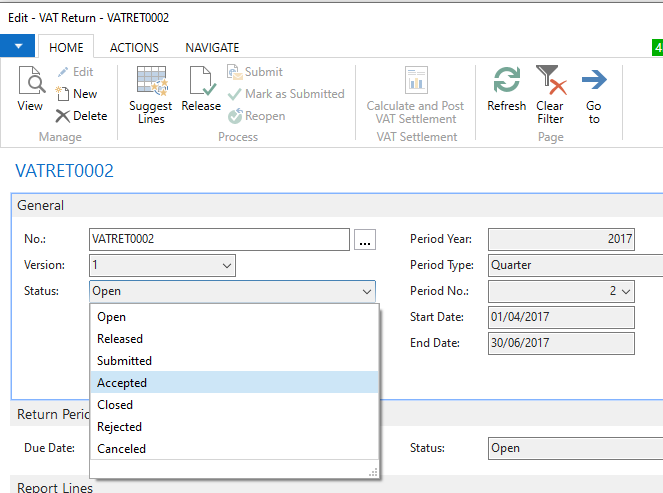
The VAT Return page >> General Fast Tab >> Status – “Submitted”
The VAT Return page >> Return Period Fast Tab >> Status field = “Open”
The VAT Return page >> Actions Ribbon >> “Download Submission Message” icon is available, and the submission file can be downloaded and opened.
The VAT Return page >> Actions Ribbon >> “Download Response Message” icon is greyed out.
Steps required to resolve this issue
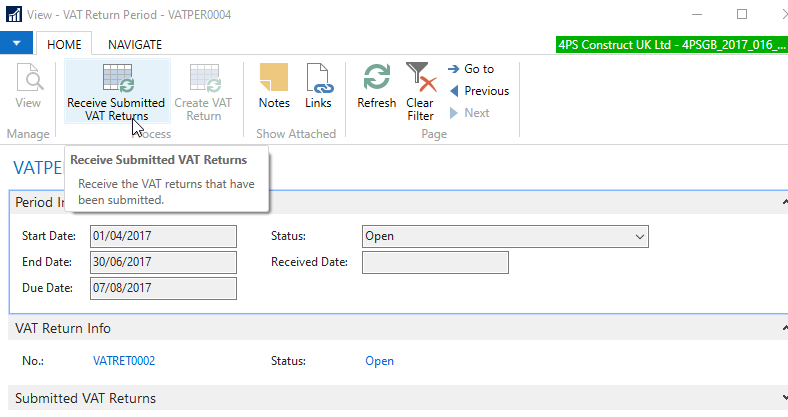
Navigate to the VAT Return Periods page >> with your cursor on the period line >> click on “View” in the home ribbon.
The VAT Return Period card is displayed. Click on “Receive Submitted VAT Returns” icon.
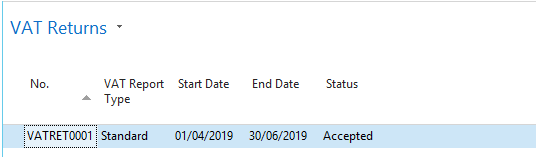
The VAT Return status is changed to Accepted.
The following message is displayed
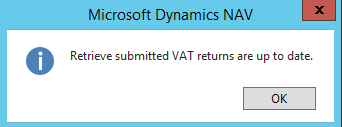
If you have any questions with the process, please do not hesitate to contact the 4PS Support team.

Bringing together the materials, plant and people a project needs, and all at the right time - good planning is an indispensable part of your business process.

Manage resources, react to requests, handle demanding clients and schedule teams of engineers with the 4PS Service and Maintenance solution.

Powerful, flexible and full of rich functionality – world-class finance and procurement for the construction industry.

Accurate and complete estimates for your construction business. Create tailor-made estimates to suit any size of project.

Go paperless with 4PS Document Management for easy storage, retrieval, updating and sharing of key documents.

Tools that help you track, control and analyse key project information.

Offering a total solution for plant management in any size and type of organisation.
Please fill in your name and E-mail to download this file.